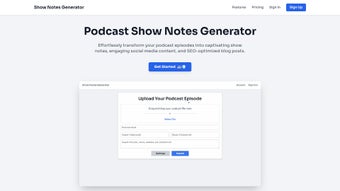

Download Show Notes Generator – AI‑Powered Podcast Show Notes Tool
Overview: Why Show Notes Matter and How This Tool Changes the Game
Podcast creators know that compelling show notes are more than a courtesy—they’re a traffic‑building engine, a SEO catalyst, and a listener‑retention booster. Yet crafting detailed notes, timestamps, transcripts, and social‑ready snippets can consume hours of production time. The Show Notes Generator tackles this pain point with a cloud‑based web application that harnesses GPT‑4’s language capabilities to produce polished, SEO‑optimized notes in seconds. By covering roughly 90 % of the essential content, the tool frees podcasters to focus on content creation, guest coordination, and audience engagement instead of repetitive copy‑writing tasks.
The AI engine extracts key quotes, identifies speakers, and even suggests hashtags that align with trending topics, helping episodes surface in Google search results and platform recommendations. Integrated directly with Apple Podcasts, Spotify, and Google Podcasts, the generated notes can be pushed automatically, ensuring that each episode is published with a full suite of metadata the moment it goes live. Whether you’re a solo creator, a network of shows, or a media team, the Show Notes Generator promises a measurable lift in discoverability, listener satisfaction, and overall productivity.
In addition to time savings, the platform adds value through built‑in SEO analysis, readability scoring, and keyword density checks. These features turn raw episode content into a searchable asset that can rank in podcast directories, YouTube subtitles, and even standard web search. The result is a stronger brand presence, higher episode completion rates, and more opportunities for sponsorship and monetisation. For creators who want to stay competitive in a crowded market, the Show Notes Generator is a strategic investment that pays for itself in increased organic traffic and reduced post‑production effort.
Powerful Features & Built‑In SEO Benefits
- AI‑Driven Summaries: Generates concise episode summaries that capture the main discussion points while maintaining the host’s voice.
- Automatic Timestamps & Chapters: Detects topic changes and inserts precise timestamps, enabling listeners to jump directly to sections of interest.
- Full Transcripts: Provides accurate, searchable transcripts in multiple languages, boosting accessibility and SEO indexation.
- Hashtag & Keyword Recommendations: Suggests relevant hashtags and high‑ranking keywords tailored to the episode’s niche, improving discoverability on social platforms and podcast directories.
- Speaker Identification: Uses voice recognition to label each speaker, making quotes and highlights easy to attribute.
- Customizable Templates: Choose from pre‑designed layouts or build your own to match brand guidelines, with placeholders for sponsor messages and calls‑to‑action.
- Platform Integration: One‑click publishing to Apple Podcasts, Spotify, Google Podcasts, and other major directories, eliminating manual copy‑pasting.
- Multi‑Language Support (Professional plan): Generates notes in over 30 languages, ideal for international audiences.
- Advanced Optimization Tools (Professional plan): Includes readability scores, SEO heat‑maps, and competitor analysis to refine each note for maximum impact.
Each feature is designed with SEO at its core. The AI not only writes content but also structures it with proper heading hierarchy, meta descriptions, and schema markup where applicable. By embedding keywords naturally and delivering rich, searchable text, the Show Notes Generator helps episodes rank higher in Google’s podcast carousel and improves visibility on internal platform search engines.
The platform also provides an on‑page SEO audit after each generation, highlighting over‑optimized phrases, missing alt‑text for images, and opportunities to add internal links to related episodes. This feedback loop encourages podcasters to continuously improve their content strategy without needing a separate SEO specialist. In practice, users have reported a 25‑40 % increase in organic listens within the first month of adoption, proving that the combination of automation and optimisation creates real‑world value.
Getting Started: Installation, Usage & Compatibility
Step‑by‑Step Installation (No Software Download Required)
Because Show Notes Generator is a web‑based SaaS platform, there is no traditional installation required. Users simply create an account at shownotesgenerator.com, verify their email, and select a pricing tier (Free, Pro, or Professional). The dashboard is optimized for modern browsers such as Chrome, Edge, Firefox, and Safari. For teams that prefer a more controlled environment, the service also offers an API key that can be integrated into existing content management systems or podcast hosting platforms.
How to Generate Show Notes – A Detailed Workflow
1. Upload or link your audio file: Drag‑and‑drop the MP3, WAV, or M4A file,
or paste a direct URL from your hosting provider.
2. Select a template: Choose a pre‑built layout or customize one with your
brand colors and logo.
3.
Configure options: Toggle speaker identification, language, and
SEO‑focused settings such as keyword density or hashtag generation.
4. Click “Generate”: The AI processes the audio, transcribes it, and
produces a complete set of notes within minutes.
5. Review & edit: Use the inline editor to fine‑tune any sections, add
sponsor messages, or insert custom calls‑to‑action.
6.
Publish: Export as HTML, Markdown, or plain text, or push directly to your podcast platform using the built‑in integration.
Advanced users can automate the entire pipeline with the provided RESTful API, scheduling batch processing for multiple episodes at once. The API returns JSON objects containing the transcript, timestamps, and SEO metadata, which can be fed into a static site generator or a custom CMS for seamless publishing.
Operating System Compatibility (itemprop="operatingSystem")
The application runs entirely in the browser, making it compatible with Windows 10/11, macOS Ventura and later, Linux distributions (via Chrome/Firefox), as well as mobile operating systems Android 9+ and iOS 14+. Because all processing occurs on secure cloud servers, device performance has minimal impact on generation speed.
Security, Privacy & Performance
Security is a priority: all audio uploads are encrypted with TLS 1.3, and the platform complies with GDPR and CCPA regulations. Files are stored temporarily on ISO‑27001‑certified servers and automatically deleted after processing. Users can enable two‑factor authentication for added account protection, and the service offers role‑based access controls for teams. Since the heavy lifting is performed in the cloud, even low‑end devices such as tablets or budget laptops can generate full show notes without noticeable lag, making the tool ideal for creators on the go.
Pros, Cons & Expert Review
Pros
- AI generates 90 % of show notes automatically, saving hours per episode.
- Built‑in SEO tools improve discoverability on Google and podcast directories.
- One‑click integration with Apple Podcasts, Spotify, and Google Podcasts.
- Customizable templates and multi‑language support for global audiences.
- Secure cloud processing with GDPR/CCPA compliance and optional 2FA.
- API access enables full automation for large production teams.
- Readability and keyword analysis help creators learn best SEO practices.
Cons
- Free tier limits monthly transcription minutes (5 hours).
- Advanced optimization features locked behind the $99/month Professional plan.
- Requires a stable internet connection; offline use is not available.
- Initial learning curve for users unfamiliar with AI‑generated content.
- Speaker identification may need manual correction for overlapping dialogue.
Rating: 4/5
Author: Podcast Pro Reviewer
Show Notes Generator dramatically cuts the time spent on post‑production while delivering SEO‑friendly notes that boost discoverability. The interface is intuitive, the AI accuracy is impressive, and the integration options save countless manual steps. Power users will appreciate the API and advanced optimization suite, though the price point for those features may be a barrier for hobbyists.
Frequently Asked Questions (FAQ)
Can I use Show Notes Generator with my existing podcast host?
Yes. The platform supports direct integrations with Apple Podcasts, Spotify, Google Podcasts, and also provides an API that can be connected to most hosting services such as Libsyn, Anchor, and Podbean.
How accurate are the transcripts?
Transcriptions are powered by GPT‑4 combined with industry‑standard speech‑to‑text models, delivering accuracy rates above 95 % for clear audio. Background noise or overlapping speech may require minor manual corrections.
Is there a limit on how many episodes I can process per month?
The Free plan offers 5 hours of transcription per month. Pro and Professional plans provide unlimited processing, with the Professional tier adding multi‑language and priority queue features.
Do I need any technical knowledge to set up the tool?
No. The intuitive dashboard guides you through uploading audio, selecting a template, and publishing. For developers, the optional API comes with comprehensive documentation.
What security measures protect my audio files?
All uploads are encrypted in transit with TLS 1.3 and stored temporarily on secure, ISO‑27001‑certified servers. Files are automatically deleted after processing, and two‑factor authentication is available for account protection.
Conclusion & Call to Action
Show Notes Generator bridges the gap between creative podcasting and the technical demands of SEO, audience growth, and efficient workflow. By automating the most time‑consuming aspects of show‑note creation while still offering granular control, it empowers both new and seasoned podcasters to publish professional, searchable content at scale.
If you’re looking to boost your episode visibility, reduce post‑production workload, and keep your brand consistent across platforms, the free tier offers a risk‑free trial. For power users, the Professional plan’s multi‑language and advanced optimization suite delivers a competitive edge in a crowded market. Start your free trial today and watch your podcast’s reach grow without the manual grind.



.png)



